
01
Choose Your Calendar Path
Pick the delivery method that fits your calendar permissions and comfort level.
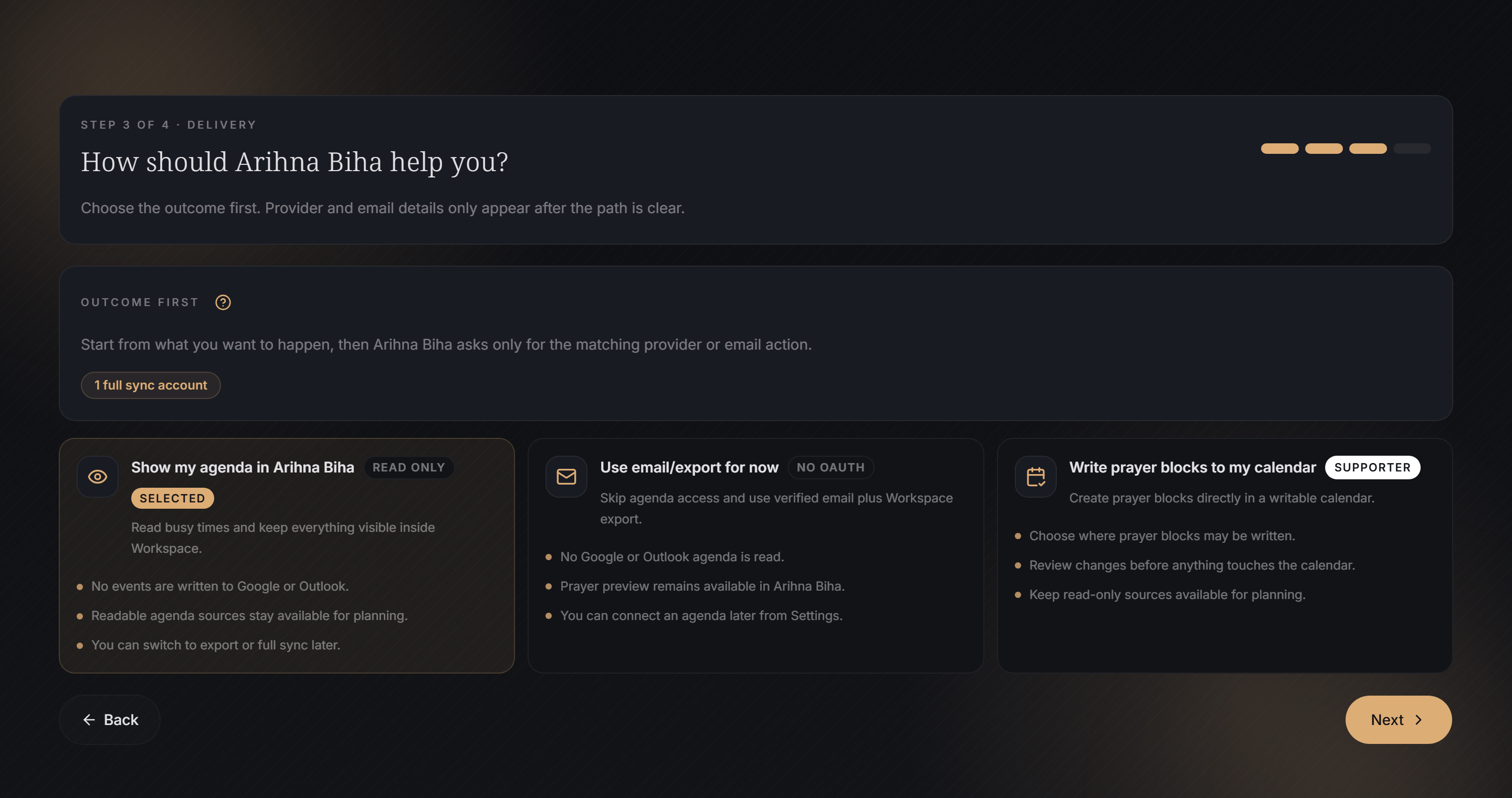
- Email/export only: no calendar OAuth. You download or receive .ics files.
- Read-only Agenda Source: Arihna Biha reads your agenda for preview and protection, but does not write to it.
- Full sync Sync Target: Arihna Biha can create, update, track, and delete its own Prayer Blocks.
- Private feed URL: your calendar subscribes to a separate read-only prayer calendar.
- Invite email: one meeting invite is sent per Prayer Block.
Path examples
No calendar access
Setup: Use Download .ics or grouped .ics email.
Expected: You manually import the file. Arihna Biha does not read or write any provider calendar.
Preview around real meetings
Setup: Connect a read-only Agenda Source and make it visible in Workspace.
Expected: Arihna Biha can see blocker events for preview and protection, but it cannot create or edit calendar events.
Hands-off updates
Setup: Use a writable Sync Target or Supporter scheduling.
Expected: Arihna Biha can keep app-owned Prayer Blocks refreshed and remove them later through app actions.
Best first choice
If you are unsure, use read-only agenda access or email/export first. Upgrade to full sync when you want Arihna Biha to manage blocks directly.
02
Connect Calendars
Understand Calendar Connections, Agenda Sources, Sync Targets, and account limits.
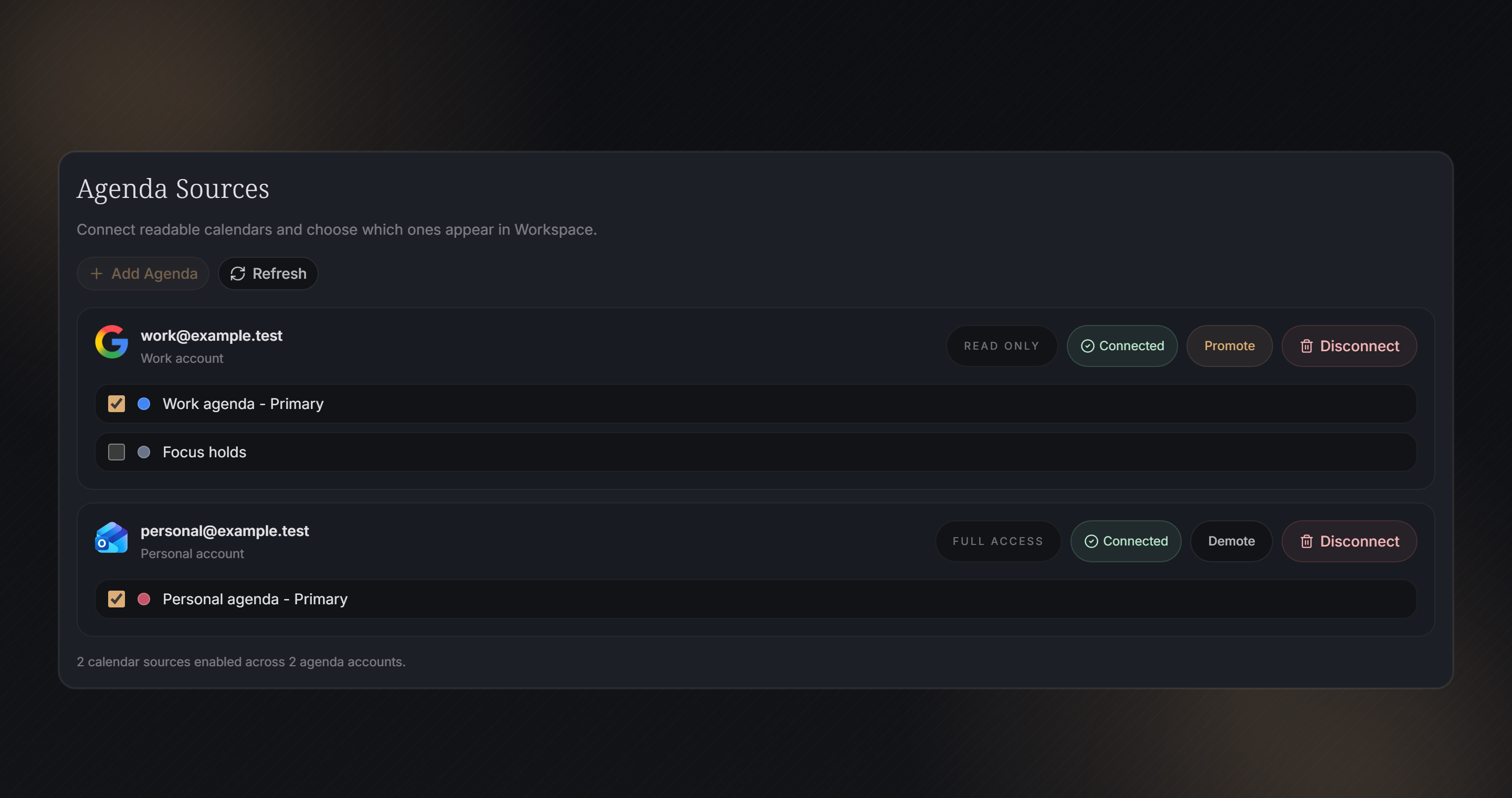
- Calendar Connection
- A connected Google or Outlook account.
- Agenda Source
- A calendar Arihna Biha can read for preview and conflict context.
- Sync Target
- A writable calendar Arihna Biha can use for direct sync.
- Read-only access lets the app see busy events, but not create or edit them.
- Read-write access lets the app manage Arihna Biha-owned Prayer Blocks.
- Community access uses one active agenda account after setup.
- Supporter access unlocks full sync and higher limits.
- Switching Agenda Sources changes what Workspace reads without deleting the provider connection.
- Hidden sources stay connected, but Workspace protection ignores them until you show them again.
Connection examples
Use Work as blocker only
Setup: Connect Work calendar as an Agenda Source with read-only access.
Expected: Workspace can avoid work meetings, but Sync cannot write Prayer Blocks to that calendar.
Write prayers to a managed calendar
Setup: Select a writable calendar as a Sync Target.
Expected: Sync creates and updates Arihna Biha-owned Prayer Blocks on that target only.
Switch from Work to Personal agenda
Setup: Hide Work and show Personal in Agenda Sources.
Expected: Workspace protection now uses Personal events as blockers without disconnecting Work.
03
Private Feed URLs
Use a private subscription URL when you want a separate read-only prayer calendar that can publish protected prayer blocks.
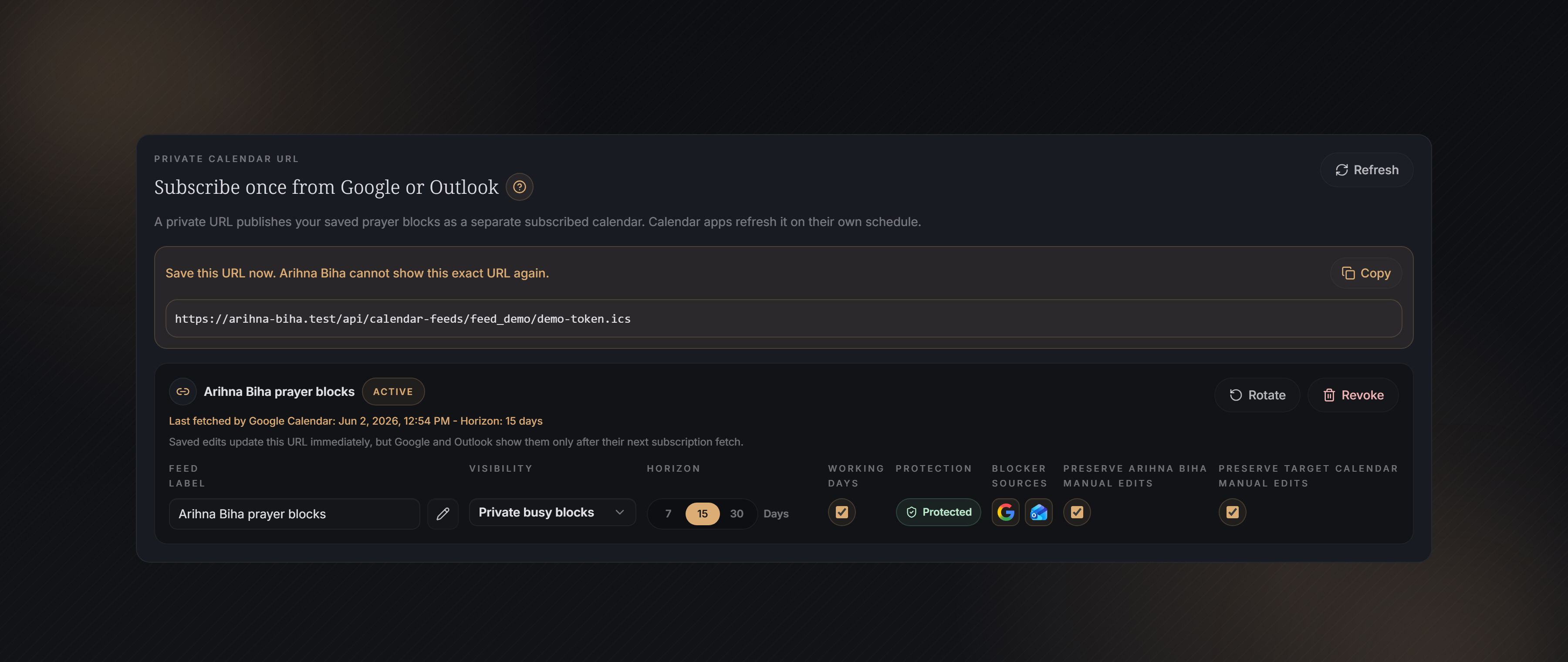
A private feed URL publishes your saved prayer blocks as a separate subscribed calendar. If Protection is on, Arihna Biha recalculates the protected prayer blocks when the feed is fetched.
- Copy URL copies the private subscription link. Add it in Google, Outlook, Apple Calendar, or another calendar app as a subscribed calendar.
- Horizon controls how many future days the feed exposes.
- Visibility mode controls whether the subscribed events show prayer details or private busy blocks.
- Working days only removes weekend prayer blocks from that feed.
- Protection publishes prayer blocks adjusted around readable agenda blockers when a clean valid slot exists.
- Blocker sources choose which readable Agenda Sources can move protected prayer blocks for this feed.
- Preserve Arihna Biha manual edits keeps prayer moves you made inside Arihna Biha when protection recalculates the feed.
- Preserve target calendar manual edits keeps moved or deleted app-owned events from direct sync when the same settings are used there.
- State pauses or resumes the private feed without rotating or revoking its URL.
- Active means the URL can still be fetched. Rotate changes the secret URL; Revoke stops future access.
- Last fetched records the last time a calendar app requested the URL, when Arihna Biha can identify that request.
- Saved changes update what Arihna Biha returns immediately, but calendar apps may show cached events until they pull the URL again.
- Stable event IDs help subscribed calendars update moved prayer blocks instead of creating duplicates.
- Rotate URL creates a new private link and invalidates the old one.
- Revoke stops future access for that feed.
Feed examples
You copy the URL into Google Calendar
Setup: Create a feed, copy the URL, then subscribe from Google Calendar.
Expected: Google decides when to refetch it. Arihna Biha may be updated before Google shows the new events.
Protection is on
Setup: Keep Protection enabled and make sure the agenda sources you want as blockers are readable by Arihna Biha.
Expected: Each feed request is generated from the latest saved prayer settings and blocker data. The calendar app still displays the update only after its next subscription refresh.
Last fetched is older than your latest edit
Setup: You saved a manual move or a new blocker appeared after Google or Outlook last fetched the URL.
Expected: The feed content is already updated in Arihna Biha, but the calendar app can keep showing the old version until it pulls the URL again.
You want Work to block, but not Personal
Setup: Leave Protection on, keep the Work blocker chip active, and turn off the Personal blocker chip.
Expected: Arihna Biha protects feed prayer blocks around Work events only. The same URL returns the updated feed on the next calendar-app fetch.
You need to pause access temporarily
Setup: Switch the feed State to Disabled.
Expected: The URL is not destroyed. Re-enable it later to let subscribed calendar apps fetch the feed again.
You shared the URL by mistake
Setup: Click Rotate URL.
Expected: The old URL stops working. Copy the new URL into the calendar apps that should still have access.
You no longer want a feed
Setup: Click Revoke.
Expected: Future feed requests stop. Existing subscribed calendars may keep old cached events until they refresh.
Feed updates are pull-based
Arihna Biha cannot push private feed changes into Google, Outlook, or Apple Calendar. Full sync can write updates directly; a private feed waits for the calendar app to request the URL again.
04
Send, Sync, Delete
Understand every Workspace action before it changes a calendar or sends files.
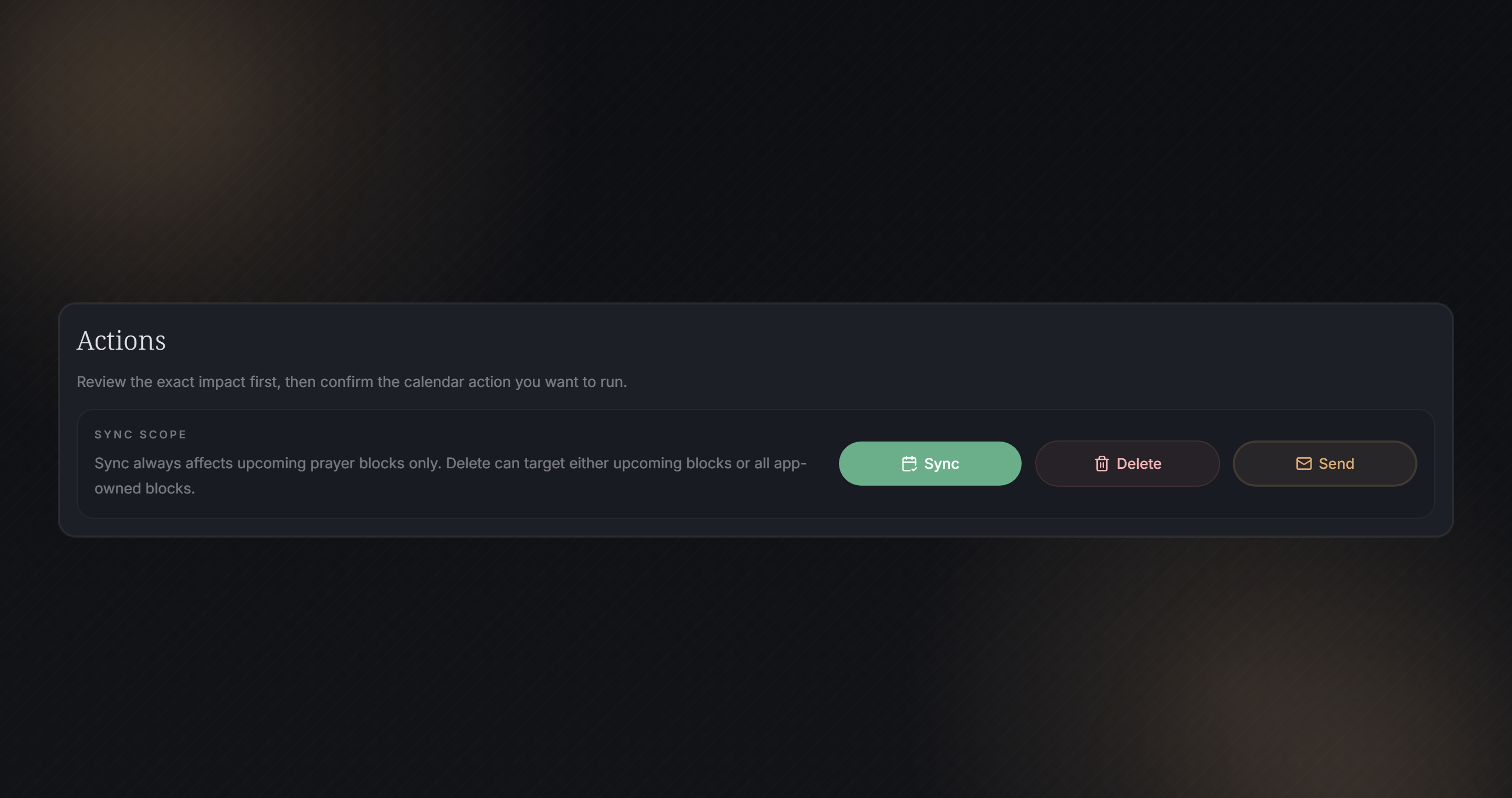
- Download .ics creates a calendar file on your device.
- Grouped .ics email sends one calendar file by email.
- Calendar invitations are marked Coming soon. Arihna Biha currently sends .ics calendar files by download or grouped email.
- Regenerated .ics files keep the same event identity for the same Prayer Block so calendar imports can update earlier Arihna Biha events instead of creating unrelated copies.
- Sync writes Arihna Biha-owned blocks to selected Sync Targets.
- Delete removes Arihna Biha-owned synced blocks based on the chosen scope.
- Undo restores the latest eligible delete.
- Before Sync or Send, the review dialog previews visible Agenda Source conflicts in the selected range.
- If conflicts appear, choose Protect first, adjust the range, or continue knowingly after review.
- The review checkbox confirms you inspected the targets and expected impact.
Examples
You only want a file
Setup: Use Download .ics.
Expected: Arihna Biha creates a file. No calendar account is changed by the app.
You want automatic calendar placement
Setup: Use Sync on a writable Sync Target.
Expected: Arihna Biha creates, updates, and can later delete only its own Prayer Blocks.
You want recipients to import by email
Setup: Use Grouped .ics email.
Expected: Arihna Biha sends one .ics file. Re-importing a regenerated file can update the same Prayer Blocks because their event identity stays stable.
Conflicts appear before delivery
Setup: Open Send or Sync while visible Agenda Source conflicts exist in the selected range.
Expected: The dialog shows the conflict preview before confirmation, with a Protect first path and range controls.
05
Troubleshooting And Safety
Fix common calendar problems and protect private calendar access.
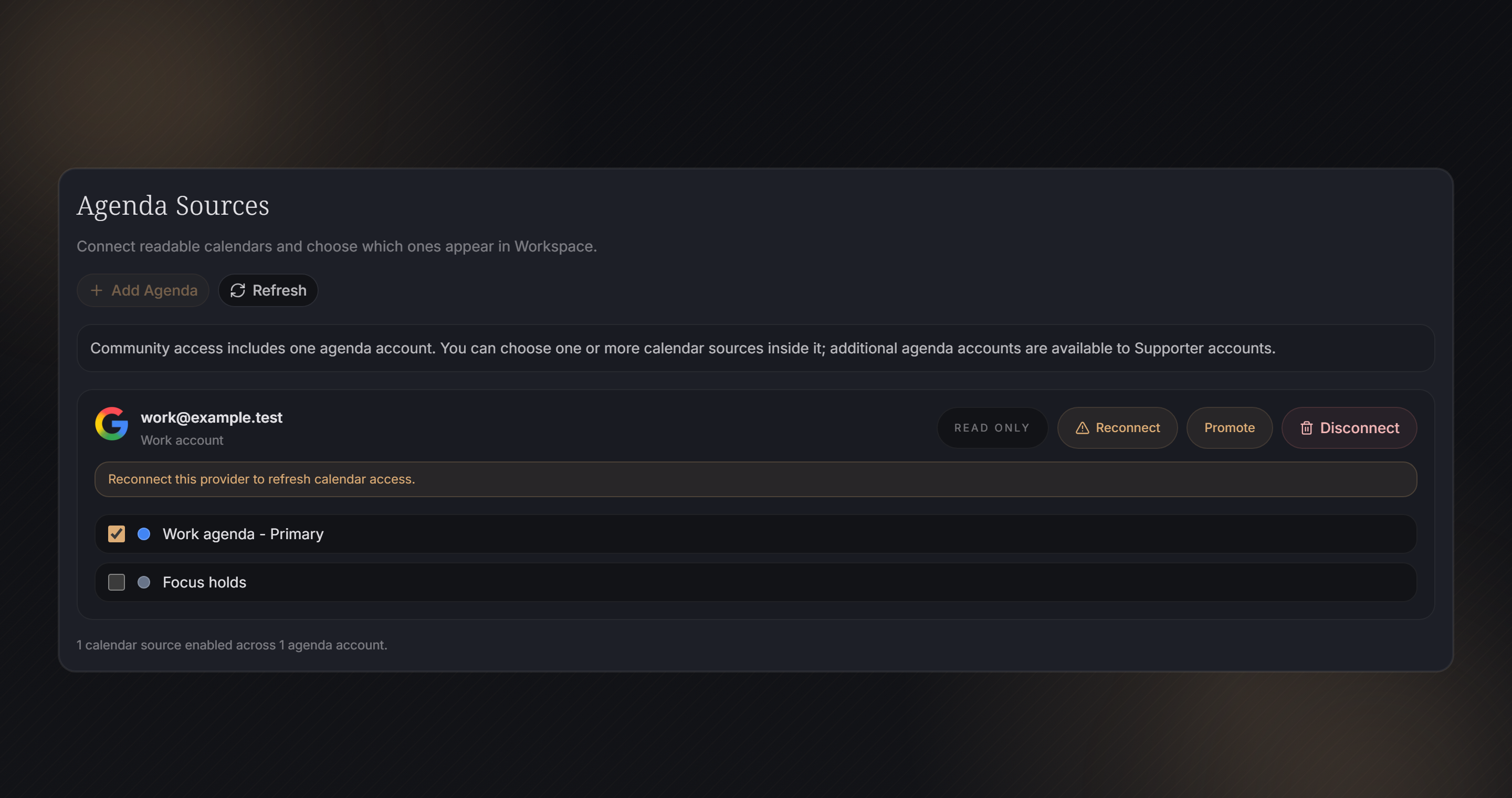
- Reconnect when Google or Outlook permissions expire or are revoked.
- Ask your workplace admin if organization policy blocks app permissions.
- Wait for Google or Outlook to refetch private feed URLs before assuming they failed.
- Direct sync is the most deterministic way to place blocks on a calendar.
- Invite email placement depends on the recipient calendar settings.
- Rotate a private URL if it was exposed. Revoke it if access should stop.
Troubleshooting examples
Feed changes are not visible yet
Setup: You changed a feed horizon or visibility mode.
Expected: The feed is updated in Arihna Biha immediately, but Google or Outlook may display cached events until its next subscription refresh.
Sync says reconnect required
Setup: A provider token expired or the account permission was revoked.
Expected: Reconnect the account from settings, then retry Workspace or scheduling.
Invite emails do not auto-place
Setup: The recipient calendar receives invites but does not add them automatically.
Expected: That behavior is controlled by the recipient provider settings, not by Arihna Biha.